Protege AI Review

Compliance approvals that keep up with marketing.

Every asset is checked against your rules before it ships. Once it's live, Review keeps scanning your pages and social accounts for missing disclosures and changes nobody sent for approval.

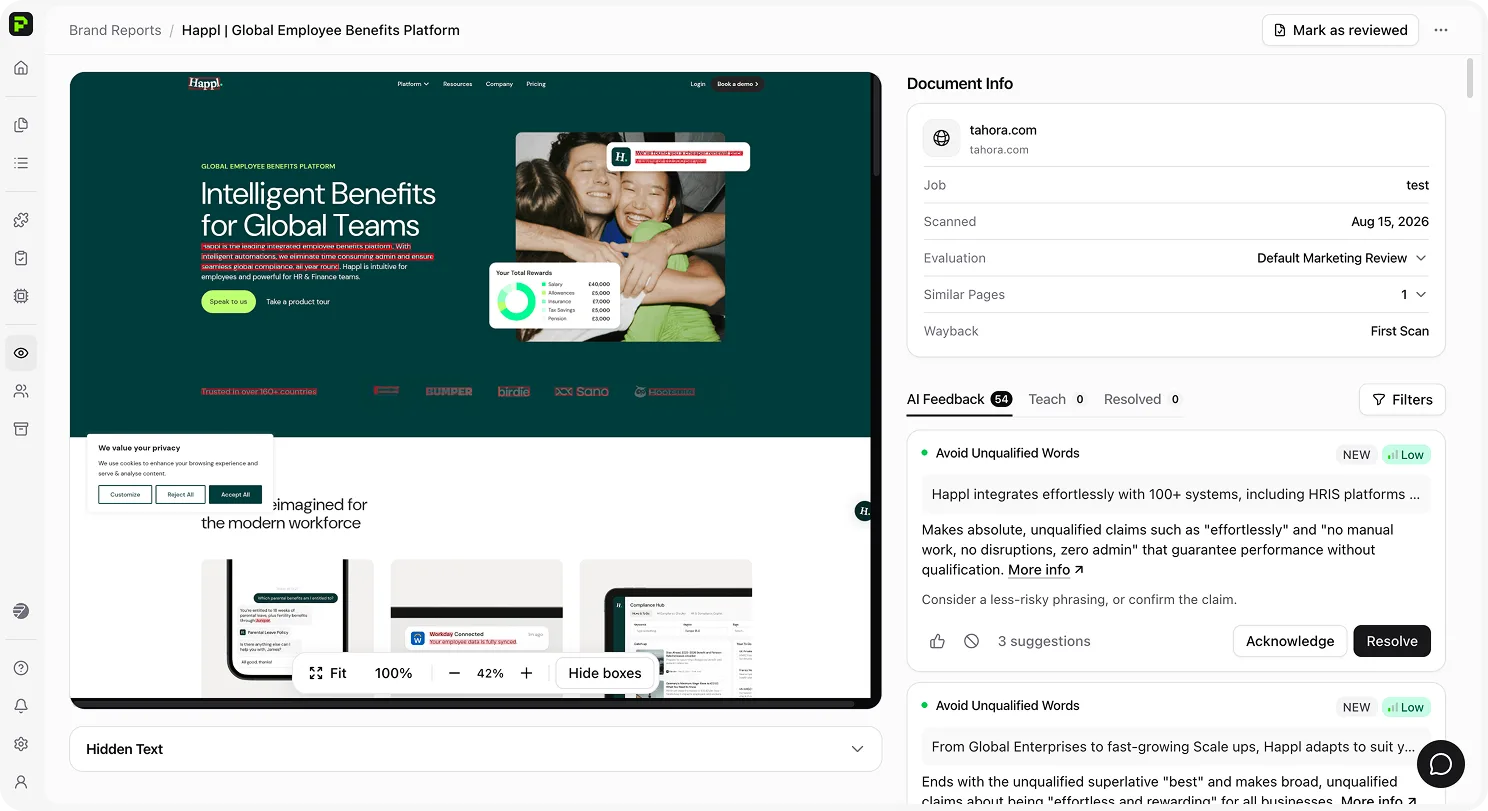
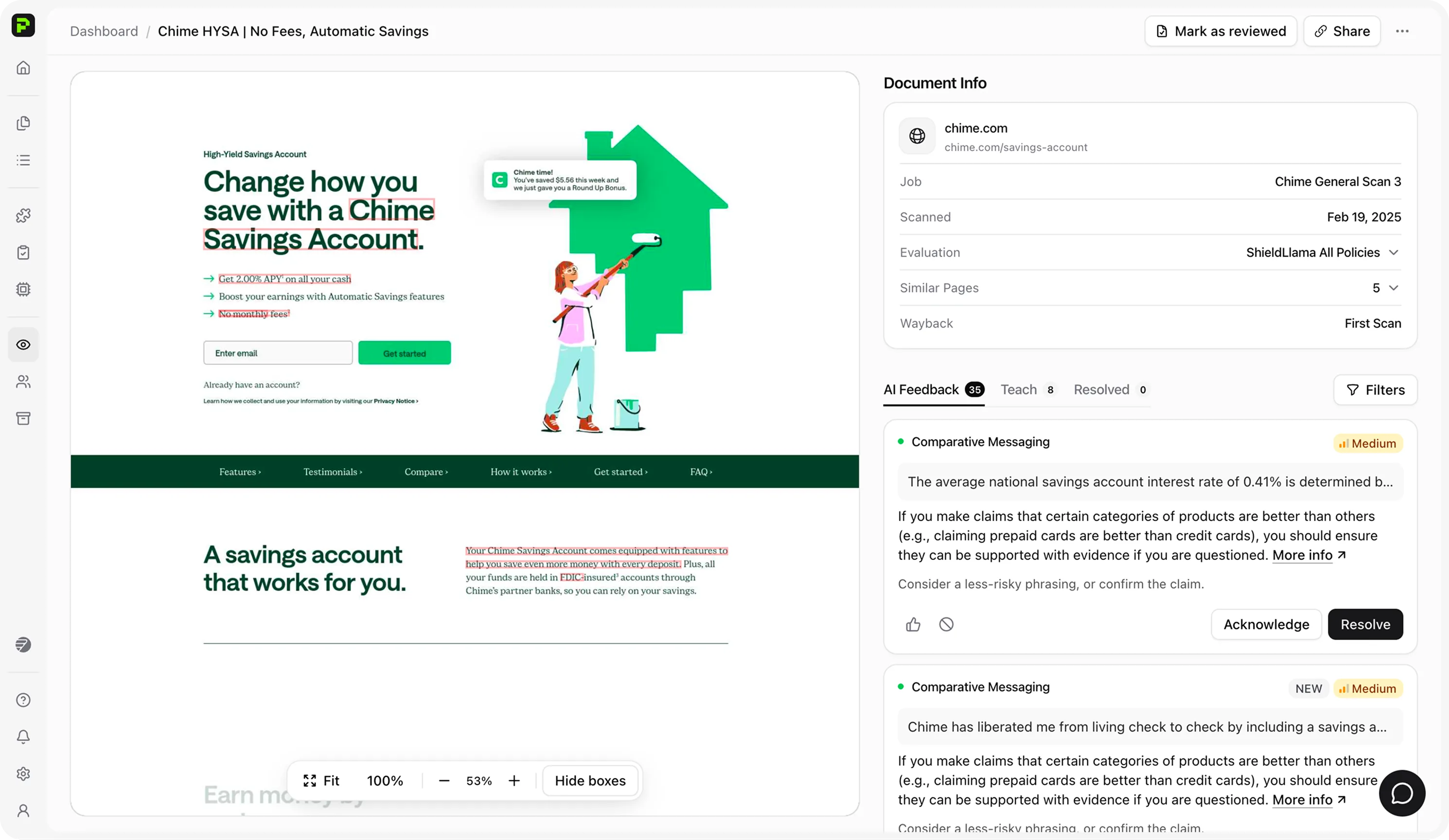
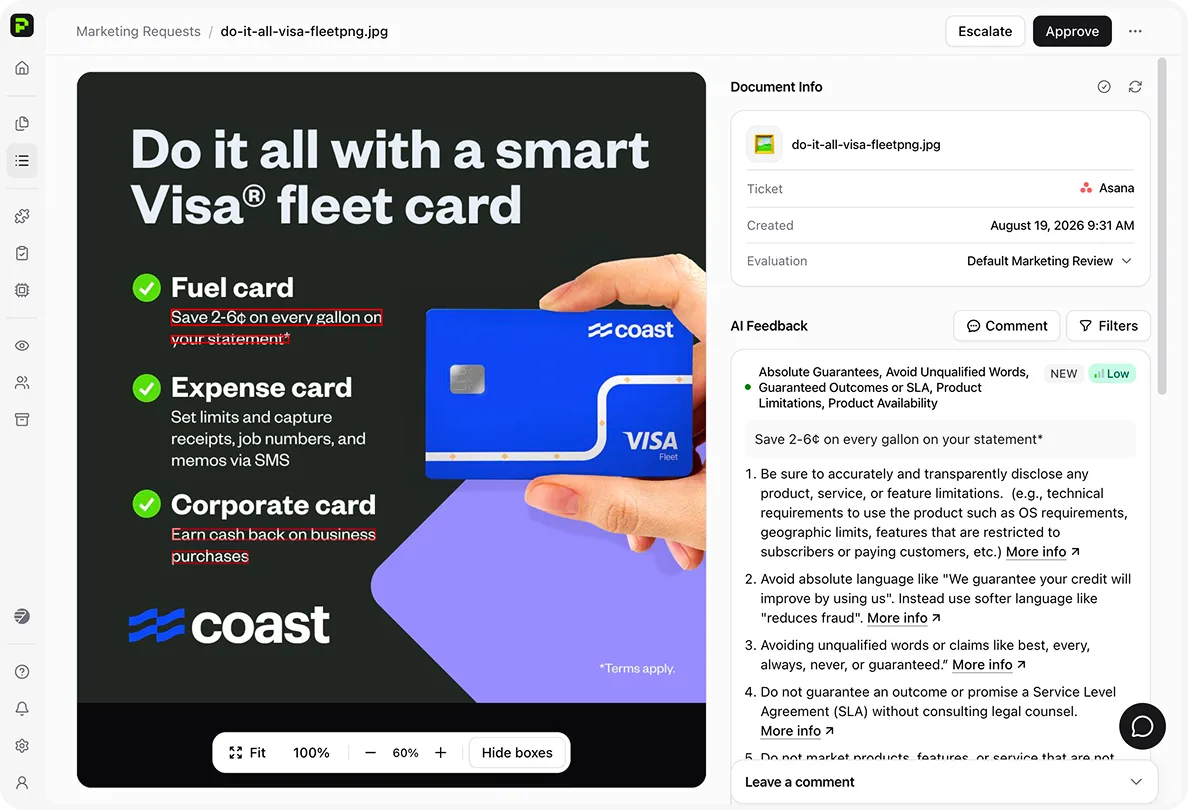
Protege AI Review — annotated marketing asset with product-claim findings, risk level, and Approve or Escalate controls.
1M+ Documents reviewed annually (customer deployments)
98.8% Median client accuracy across deployments*
88% Fewer high-risk findings in five months (customer deployment)

*Median client accuracy across all deployments (September 2025).

Document Review Capabilities

Catch policy issues before and after content goes live.

Use the same policies for approvals and monitoring. Every decision stays in the audit trail.

Protege AI Review — marketing asset approval with flagged product claims, AI feedback, and Approve or Escalate controls

Step 01

Approvals

  • Every submission is checked before launch. Review applies your policies inside the tools your team already uses.
  • Low-risk content can clear automatically. You decide the thresholds.
  • Reviewers see exactly what needs attention. Unsupported claims, trademark issues, and missing disclosures appear in context.
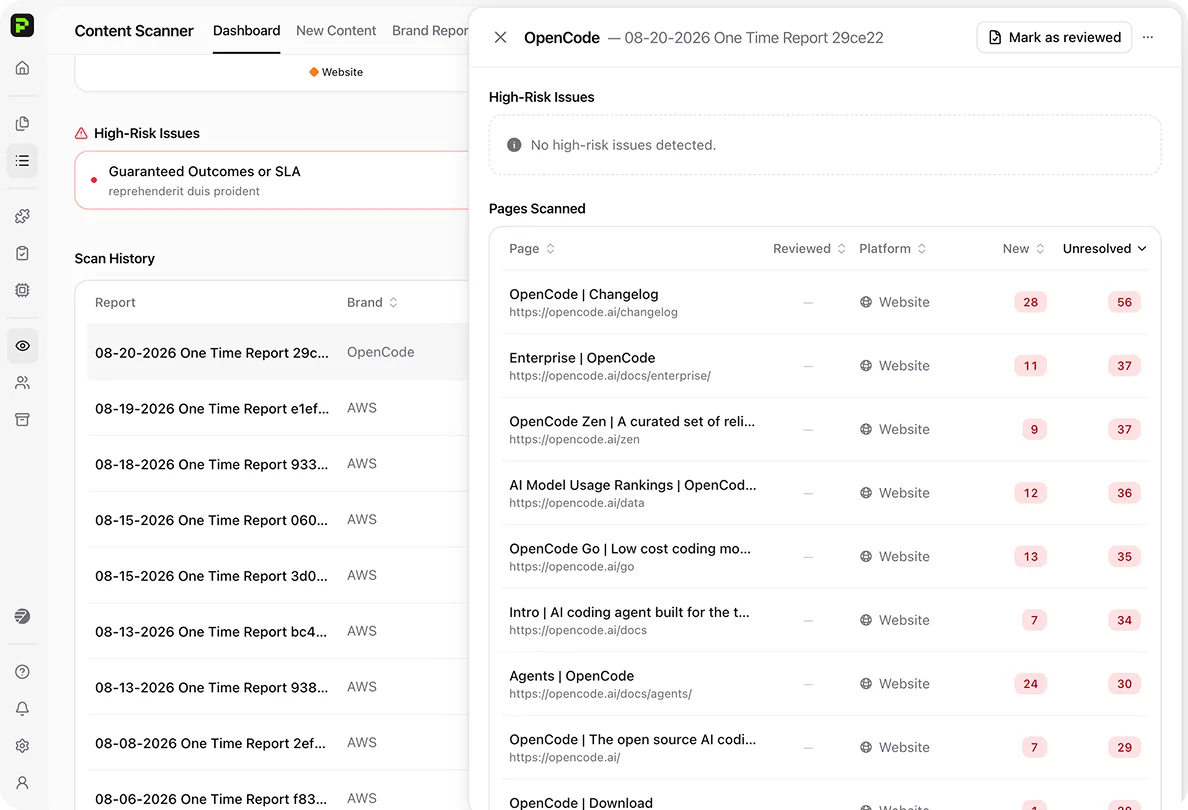
Protege AI Review — content scanner brand reports with crawled pages, new findings, and unresolved issues

Step 02

Monitoring

  • You set the scan schedule. Review monitors sites and social accounts at your cadence.
  • Coverage goes beyond the legal queue. Blogs and release notes are included too.
  • New findings stay organized. Everything collects in one remediation queue.
  • Future reviews start faster. Cleared language is saved to the Decision Store.
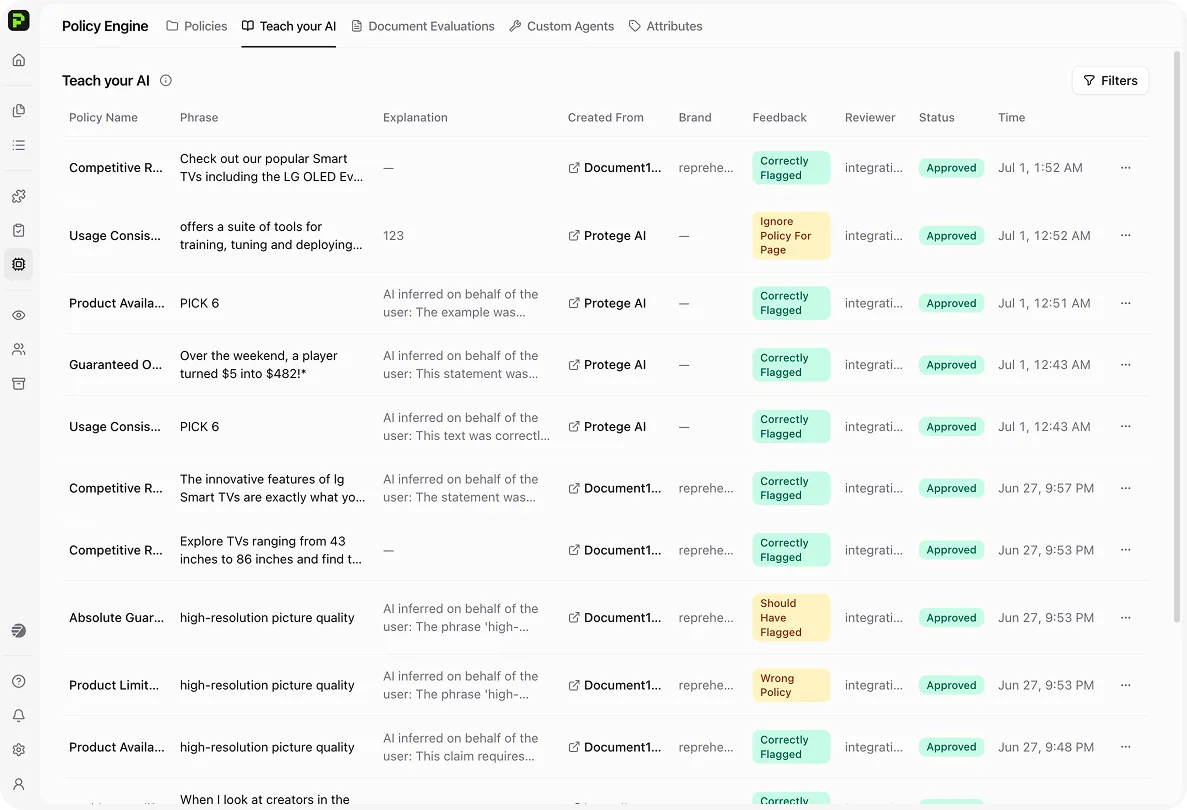
Protege AI Review — Teach Your AI feedback table with policy corrections and reviewer approvals

Step 03

Teach Your AI

  • Correct findings in context. Override a result where it appears.
  • Review remembers your team's decision. It applies the same judgment on future passes.
  • No prompts or model training required. Your team teaches Review through normal feedback.

Step 01

Approvals

  • Every submission is checked before launch. Review applies your policies inside the tools your team already uses.
  • Low-risk content can clear automatically. You decide the thresholds.
  • Reviewers see exactly what needs attention. Unsupported claims, trademark issues, and missing disclosures appear in context.

Step 02

Monitoring

  • You set the scan schedule. Review monitors sites and social accounts at your cadence.
  • Coverage goes beyond the legal queue. Blogs and release notes are included too.
  • New findings stay organized. Everything collects in one remediation queue.
  • Future reviews start faster. Cleared language is saved to the Decision Store.

Step 03

Teach Your AI

  • Correct findings in context. Override a result where it appears.
  • Review remembers your team's decision. It applies the same judgment on future passes.
  • No prompts or model training required. Your team teaches Review through normal feedback.

Customer story

Regulated programs run approvals on Review.

Five senior officers re-reading the same disclosures became two analysts on escalations only. The change-request queue stopped being the bottleneck.

Ecosystem

Works where you already work.

Meet teams inside the editors, ticket queues, and social channels they already use.

Review integration hub connecting marketing, task, communication, and productivity tools
  • Marketing Creation
  • Task Trackers
  • In-Editor Review
  • Social Media
Review connects to marketing creation tools, task trackers, in-editor review, and social media.

FAQ

Common questions.

Pre-approval screens new submissions before they ship. Continuous monitoring crawls live sites and social accounts on a cadence you set. Drift, missing disclosures, and edits that never hit the queue show up without waiting for the next exam. Protege AI Review does both on one ruleset.

Content enters from your editors or ticket queue. Review checks it against your Policy Engine for claims, trademarks, disclosures, and brand rules. Low-risk items can auto-approve. Higher-risk items go to a human with findings attached. Approved language lands in the Decision Store so the next pass is faster.

Protege AI Review scans documents, web pages, social posts, images, and videos against your rules. That covers legal risk, trademarks, unsupported claims, and regulatory issues, both before content goes live and after it is published.

Reviews run in Google Docs and Slides, Microsoft Word, Figma, and Adobe Creative Cloud, or from the Review dashboard. Intake can come from Asana, Jira, Smartsheet, or Wrike. File scanning covers Google Workspace, SharePoint, and Frame.io.

The Policy Engine holds your rules, grouped by document type, brand, and attributes such as market or product. Each policy is a named guideline. The AI follows its steps for claims, trademarks, disclosures, and the rest of your standards.

A shared library of claims, trademarks, and marketing language Review has seen or approved. Standing and limited approvals reuse cleared language. Required disclosures are checked when a claim appears again. Scans can log language already in use so the next review starts from what is already live.

You schedule scans of brand sites and social accounts on a cadence you choose. Findings can feed the Decision Store and a remediation queue. Use it for properties that rarely hit the legal queue, like blogs, partner pages, and release notes, as well as primary marketing sites.

Clients track review outcomes against their own gold standards and workflows. The 98.8% median accuracy figure reflects deployed customer measurements across use cases (September 2025). Your results depend on materials, configuration, and process.

No. Review accelerates triage and consistency checks. High-risk items still flow to humans. The system reduces noise and keeps escalations where your rules require them.

Reviewers mark findings in context. Approved feedback can retrain your organization's model. Teach Your AI and custom feedback behavior are in public beta on Enterprise plans.

Yes. Review detects the source language, translates for policy checks, and lets reviewers compare original and translated text. Supported languages include Spanish, French, German, Japanese, Chinese, Korean, Arabic, and others. Confirm the pair you need during onboarding.

Enterprise includes SSO. Documented providers are Duo, Google Workspace, Azure AD, and SAML. Role-based access is managed in the workspace. Archiving options cover SEC, FINRA, and FTC record-keeping needs.

Build with us

See Protege AI Review in your stack.

Book a walkthrough. We'll run your content against your rules and show you exactly what Review flags.

Request Demo
Protege AI Review — video marketing review with visible text findings, product-claim risk, and Approve or Escalate controls.