Atlassian Rovo is Atlassian’s generative AI layer for Atlassian Cloud: a unified search, chat, and agent platform that helps teams find organizational knowledge, ask questions in natural language, and automate work inside Jira, Confluence, and Jira Service Management. Rovo is grounded in the Teamwork Graph, Atlassian’s data intelligence layer that maps people, work, goals, and content across Atlassian apps and connected SaaS tools.
If you are an ops leader, PMO lead, or IT platform owner evaluating Rovo, this guide covers what each component does, how pricing and credits work, and how to govern agents safely. It also explains where Rovo’s native capabilities end and what teams need when work must cross system-of-record boundaries.
What is Atlassian Rovo?
Atlassian Rovo unlocks organizational knowledge with generative AI. Rather than searching each app separately or copying context into a standalone chatbot, Rovo gives every licensed user a single entry point to find information across the stack, learn from connected context, and act on work through AI agents, all within the permissions model your admins already enforce.
Rovo ships as three core experiences plus a builder:
| Component | What it does |
|---|---|
| Rovo Search | Cross-app search across Atlassian and connected SaaS |
| Rovo Chat | Conversational AI grounded in your organization’s work context |
| Rovo Studio | No-code agent builder for custom automations |
| Rovo Agents | Task-oriented AI assistants that find, learn, and act on your behalf |
Per Atlassian, more than 90% of enterprise Cloud customers now use Rovo, and the platform logged 14 million Rovo-assisted actions in a recent month (figures from Atlassian’s Team ‘26 conference, self-reported). Atlassian’s own admin documentation describes Rovo as allowed by default on paid Cloud plans and automatically activated on Standard, Premium, and Enterprise. Org admins can block AI features per app, but cannot fully remove the Rovo product. That means the 90%+ figure tracks default-on provisioning across enterprise Cloud accounts more than it tracks daily, voluntary adoption. For an independent read on how widely Rovo is actually used, see How widely is Rovo actually used? below.
Rovo replaced the earlier Atlassian Intelligence branding for most AI features on Cloud. If your team migrated from Intelligence to Rovo in 2025, the underlying capabilities expanded, particularly around agents and the Teamwork Graph, rather than simply renaming existing inline AI.
Rovo Search
Rovo Search is a unified search bar that queries across Jira, Confluence, Jira Service Management, and 75+ connected third-party tools, including Slack, Google Drive, GitHub, Figma, and Microsoft SharePoint.
Unlike keyword search inside a single app, Rovo Search understands natural-language queries. Ask “What blocked the Q2 launch?” and Rovo returns issues, pages, comments, and connected documents ranked by relevance, filtered to what you have permission to view.
Rovo Search currently does not consume Rovo credits, making it the lowest-friction entry point for teams exploring AI inside Atlassian. For ops and IT leaders, Search is often the first capability users adopt before graduating to Chat and Agents.
Rovo Chat
Rovo Chat is Atlassian’s conversational AI interface: a panel inside Jira, Confluence, and Jira Service Management where users ask questions and get answers grounded in organizational context.
Chat draws on the Teamwork Graph to understand relationships between people, projects, goals, and content. Instead of summarizing a single page, Chat can synthesize across multiple sources: open Jira epics, related Confluence specs, linked Slack threads, and connected design files.
Common use cases include:
- Summarizing a project’s status before a standup
- Finding the decision history behind a feature flag
- Drafting a Confluence page outline from linked Jira tickets
- Answering “who owns this dependency?” without switching tabs
Each Chat interaction consumes 10 Rovo credits from your organization’s pooled monthly allowance. For teams on Standard plans (25 credits per user per month), that means roughly two to three Chat sessions per user before the pool needs monitoring. Worth planning for at rollout.
Rovo Studio
Rovo Studio is Atlassian’s no-code agent builder. Admins and power users define custom Rovo Agents without writing code, specifying triggers, instructions, knowledge sources, and actions through a visual interface.
Building an agent in Rovo Studio follows five steps:
- Choose a trigger. Select what starts the agent (a Jira event, a scheduled run, a Chat invocation, or a manual request).
- Define instructions. Write plain-language guidance for what the agent should find, learn, and act on.
- Connect knowledge sources. Point the agent at specific Jira projects, Confluence spaces, or connected SaaS data via the Teamwork Graph.
- Configure actions. Specify what the agent can do: create or update issues, post comments, generate summaries, or run Jira Service Management playbooks.
- Set permissions and publish. Assign who can invoke the agent and deploy it to your organization.
For complex logic (custom API calls, multi-step conditionals, or integrations beyond Studio’s visual builder), teams extend agents with Atlassian Forge, Atlassian’s cloud development platform for JavaScript and TypeScript apps. Forge is the escape hatch when no-code reaches its limits; most ops teams start in Studio and graduate to Forge only when a workflow demands it.
Rovo Agents
Rovo Agents are AI assistants that find, learn, and act on your behalf inside Atlassian. Atlassian uses that framing to distinguish agents from simple search or chat.
Agents differ from Chat in one important way: they take action. A well-configured agent can triage incoming Jira Service Management requests, draft Confluence release notes from linked epics, or run a multi-step playbook when an incident is declared.
Atlassian ships pre-built agents for common workflows (sprint planning, release notes, work item triage), and teams build custom agents in Rovo Studio. Agents can be invoked from Chat, triggered by Jira automation rules, or called from Jira Service Management playbooks.
The permission model matters for ops and IT buyers: agents can only access information the person using them has permission to view or edit. If a user cannot see a Confluence page, the agent cannot act on it. Agent actions are attributed to that user in the Admin Hub audit log, which ties AI behavior to individual accountability.
One caveat worth noting for automation-heavy teams: in Jira Service Management automation contexts where agents run “as the user who triggered the rule,” community testers and Atlassian issue ROVO-837 report that Rovo Search can surface links to restricted content the triggering user cannot view. That is a specific edge case in automation invocation contexts where teams may need additional output-layer controls beyond Rovo’s default permission model.
How the Teamwork Graph works
The Teamwork Graph is the context engine behind every Rovo experience. It is Atlassian Cloud Platform’s data intelligence layer: the underlying map of how work actually happens in your organization, rather than a dashboard you open separately.
The graph connects 150 billion+ objects and relationships across Atlassian apps and 75+ connected third-party tools, a figure Atlassian reports itself and one that keeps climbing (it was 100 billion+ just a quarter earlier). Every Jira issue, Confluence page, linked goal, code commit, and connected SaaS record becomes a node. Relationships (who created it, what blocked it, which team owns the dependency) become edges.
When you ask Rovo Chat a question or trigger an agent, the Teamwork Graph is what grounds the response in real organizational context rather than generic LLM output. Per Atlassian’s internal benchmarks, grounding responses in the Teamwork Graph delivers 44% more accurate answers and uses 48% fewer tokens (vendor-reported figures from Team ‘26, not independently verified). No independent source has reproduced those numbers. What practitioners report is more uneven: in one June 2026 thread, a Rovo agent summarizing Confluence runbooks fabricated steps, commands, and details that do not appear on the source page, including kubectl commands that were never documented. A team chronicling The Making of Our First Rovo Agent found their agent “confidently generate[d] imaginary releases” until they added temperature = 0 to the prompt. Grounding helps over plain retrieval, but treat the 44% figure as directional. Real-world accuracy depends on your data hygiene, indexing, and prompt design, not the graph alone.
At Team ‘26, Atlassian opened the Teamwork Graph to external developers and AI agents through three channels:
- Teamwork Graph Connectors (generally available via Forge): build custom connectors to ingest data from internal or legacy systems
- Teamwork Graph CLI (open beta): command-line access for agents like Claude Code and Cursor
- Rovo MCP Server (open beta): lets any MCP-compatible AI client query Atlassian context via
getTeamworkGraphContextandgetTeamworkGraphObject
These extensions mean the graph is no longer locked inside Atlassian’s own UI. Consuming graph data via MCP currently draws from the same Rovo credit pool.
Rovo in Jira and Confluence
Rovo is embedded directly in the tools your teams already use. There is no separate product to roll out.
In Jira, Rovo appears in the top navigation and inside issue views. Users can search across projects, ask Chat about sprint status, and invoke agents to triage, summarize, or update work items. Jira automation rules can trigger Rovo Agents as actions, connecting AI to existing rule-based workflows without rebuilding them.
In Confluence, Rovo helps teams find pages, summarize spaces, and draft content from linked Jira context. The integration is bidirectional: Confluence pages inform Jira agent responses, and Jira issues surface in Confluence search results.
In Jira Service Management, Rovo powers the Virtual Service Agent for request deflection and playbook automation. Service desk teams use agents to classify incoming requests, suggest knowledge base articles, and execute multi-step resolution workflows, all within JSM’s existing permission and SLA framework.
For platform leaders evaluating a Jira-centric AI rollout, native embedding matters: no separate login, no context switching, and permissions inherited from existing project and space configurations.
Getting started with Rovo
Rolling out Rovo does not require a separate product purchase on paid Cloud plans, but it does take setup. Here is the consolidated starting path for admins and team leads.
1. Confirm plan eligibility. Rovo is included on Standard, Premium, and Enterprise Cloud plans for Jira, Confluence, and Jira Service Management. Verify your organization’s plan tier and that Rovo is enabled in Admin Hub.
2. Connect third-party SaaS tools. Navigate to Admin Hub → Rovo → Connected apps. Atlassian provides pre-built connectors for 75+ tools; custom sources require a Forge-built Teamwork Graph Connector. Each connected app expands what Search, Chat, and Agents can see.
3. Configure permissions. Rovo inherits Atlassian’s existing permission model. Agents respect project roles, space restrictions, and issue security levels. Review which teams and projects agents can access before publishing custom agents from Studio.
4. Deploy pre-built agents first. Atlassian ships ready-made agents for common workflows. Start with these before building custom agents; they require no Studio configuration and give teams immediate value while you plan custom workflows.
5. Monitor credit consumption. Check Admin Hub → Rovo → Usage to track credit draw across Chat, Agents, and Deep Research. Set internal guidelines for which teams use credit-consuming features and which stick to free Search.
This covers the starting path. Atlassian’s support documentation has the full admin tutorial on connector configuration, Forge development, and agent permission tuning.
Pricing and Rovo credits
Rovo is included at no additional charge on paid Standard, Premium, and Enterprise Cloud plans, a shift from Rovo’s original standalone pricing model. There is no separate Rovo subscription fee when you are on an eligible Atlassian Cloud plan.
Usage is governed by Rovo credits, a pooled monthly allowance per organization:
| Plan | Rovo credits per user/month (Jira, Confluence, JSM) |
|---|---|
| Standard | 25 |
| Premium | 70 |
| Enterprise | 150 |
Credits pool at the organization level, scale with seat count, reset monthly, and do not roll over. Typical consumption: 10 credits per Chat or Agent execution; 100 credits per Deep Research session. Rovo Search is currently free.
Atlassian is not currently billing for overage beyond the included allowance. Before any overage charges take effect, Atlassian has committed to at least 90 days’ notice and an explicit opt-in. No surprise bills.
Atlassian also offers Rovo Standard as a standalone product for users who need Rovo access without a full Jira or Confluence subscription. Rovo Standard is currently in beta and free of charge; after beta ends, it will be a paid add-on at approximately $5 per user per month.
For a 100-person team on Premium, the pooled allowance is 7,000 credits per month, enough for roughly 700 Chat or Agent sessions org-wide, or 70 Deep Research runs. Finance and ops leads should model expected usage against this pool before rolling out Agents broadly.
How widely is Rovo actually used?
Read across Atlassian Community threads, Reddit, and our conversations with teams evaluating Rovo, and sentiment splits into two camps rather than one verdict. Vendor adoption metrics say Rovo is everywhere. Practitioner feedback says how much value you get depends on where you sit.
Camp 1: the pragmatists. This group treats Rovo as assistive infrastructure. They get day-one value from Search and inline summaries without a formal rollout, and they keep a human on anything that touches production work. The accepted take in one April 2026 thread captures them well: Rovo speeds up summaries and insights, but the saved time goes into validating output (“it kind of shifts the work”). Assistive, not authoritative is how they scope it. First drafts and context gathering, yes. Final answers you trust without review, no.
Camp 2: the frustrated power users and admins. This group shows up when teams push past Search and summaries toward agents, heavy automation, or cross-tool workflows. Credit economics is the loudest complaint: one admin reported a single Bitbucket PR review burning 760+ of 2,000 credits; an Atlassian PM in the same thread conceded value “drops quickly” at that burn rate, and Standard’s 25-credit allowance covers roughly two to three Chat sessions per user per month. Default-on provisioning adds fuel. “Forced rollout” and “ROVO integration is REALLY ANNOYING — I never ACCEPTED…” threads push back on Atlassian’s answer that Rovo cannot be turned off. Enterprise admins called that unacceptable where AI was approved but Rovo was not. This camp also raises trust gaps (hallucinated agent output comes up repeatedly in community threads), the lack of a native Slack or Teams bot, and mixed r/RovoDev sentiment compared with standalone coding agents. The deeper you push toward autonomous, high-volume, or cross-tool use, the louder these complaints get.
The teams we talk to echo the same split. Which camp you land in tracks with how far past Search-and-summaries you try to take Rovo.
Rovo governance and security
Atlassian has invested in native governance controls for Rovo, and they deserve a fair read.
Rovo Agents respect the same access controls as the user invoking them. An agent cannot read a restricted Confluence page or update a Jira issue the user cannot access. That baseline reduces shadow-AI risk inside Atlassian.
Agent actions are logged in Admin Hub and attributed to the user who triggered them, not a generic “Rovo” service account. Security and compliance teams can trace AI-initiated changes back to individual accountability.
For Chat and Agents, Atlassian retains inputs and outputs for 30 days for safety and security monitoring. Customer data is never used to train, fine-tune, or improve Atlassian or third-party LLMs, and LLM providers do not retain inputs or outputs beyond the request lifecycle. See Atlassian’s Rovo data, privacy, and usage guidelines and AI trust page for full details.
Organization admins manage which agents are published, which connectors are active, and which users can invoke agents, all from Admin Hub without developer involvement.
These controls work well for in-Atlassian AI governance. They do not, on their own, address every scenario enterprise ops teams face, particularly when agents run in automation contexts (see ROVO-837 above) or when the audit question is “what did the agent decide, skip, and write on this specific run across three systems?” rather than “who triggered this agent action in Jira?”
Where Rovo stops: cross-system orchestration
Rovo’s strength is depth inside the Atlassian ecosystem. Search indexes third-party data. The Teamwork Graph MCP server lets external agents query Atlassian context. Connectors bring Slack messages, GitHub PRs, and Google Docs into the graph.
But governed, multi-system-of-record actions (where an agent previews a write on a live ServiceNow case, gets approval, updates a Jira epic, and posts a summary to Slack, with a single run-level audit record across all three) is where Rovo’s native agent model reaches its design boundary. Rovo Agents are primarily built to act within Atlassian apps. External tool actions are limited to what connectors and MCP expose, without the preview-and-approve workflow ops teams need before AI writes to production records.
Atlassian designed Rovo to make Atlassian Cloud smarter, and it does that well. The gap appears when your operational reality spans multiple systems of record and your governance standard requires preview on live work before writes and a per-run agent record beyond what Admin Hub attribution logs provide.
Rovo covers Atlassian-native AI. A vendor-neutral orchestration layer covers cross-system work. They sit alongside each other.
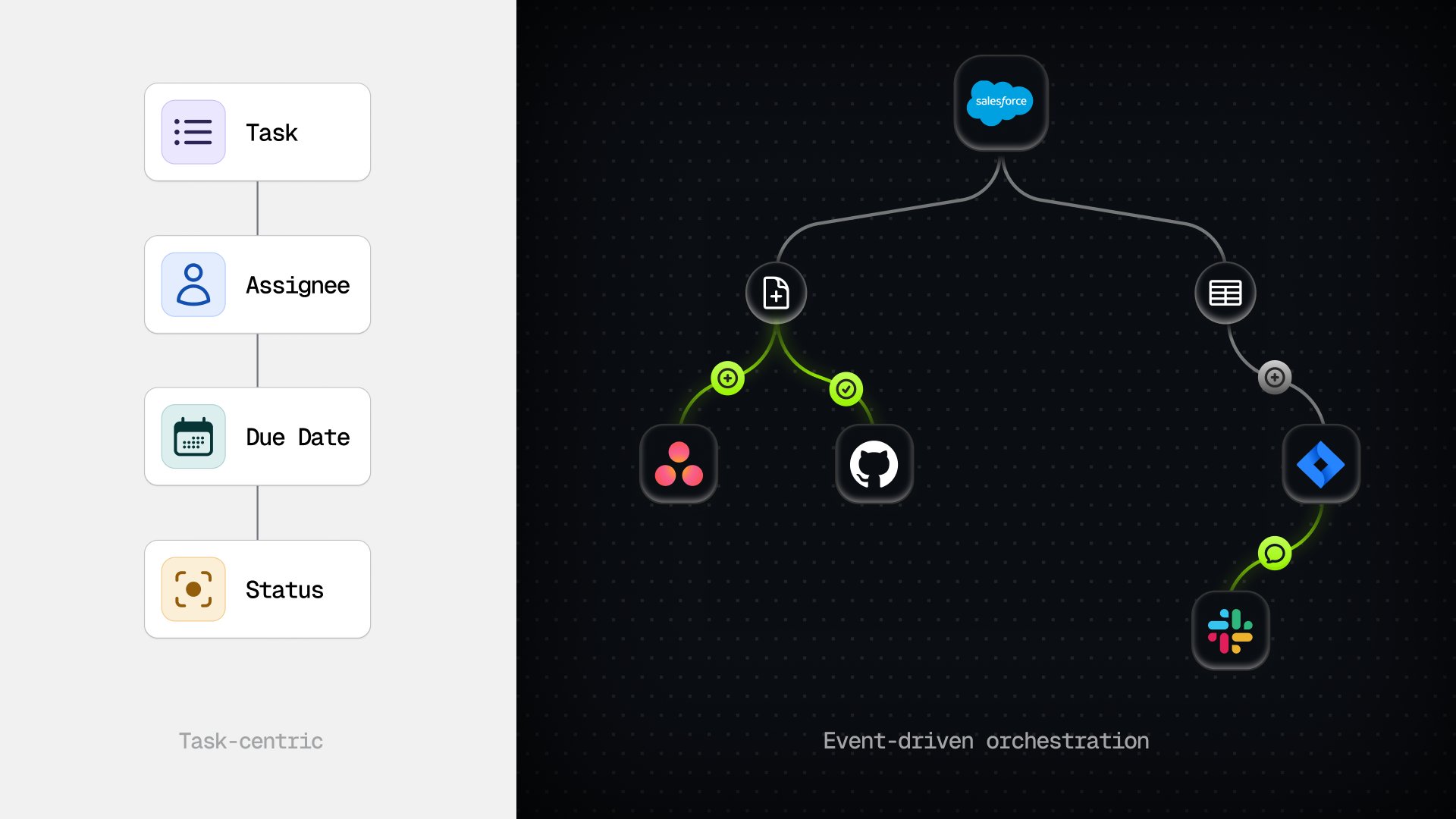
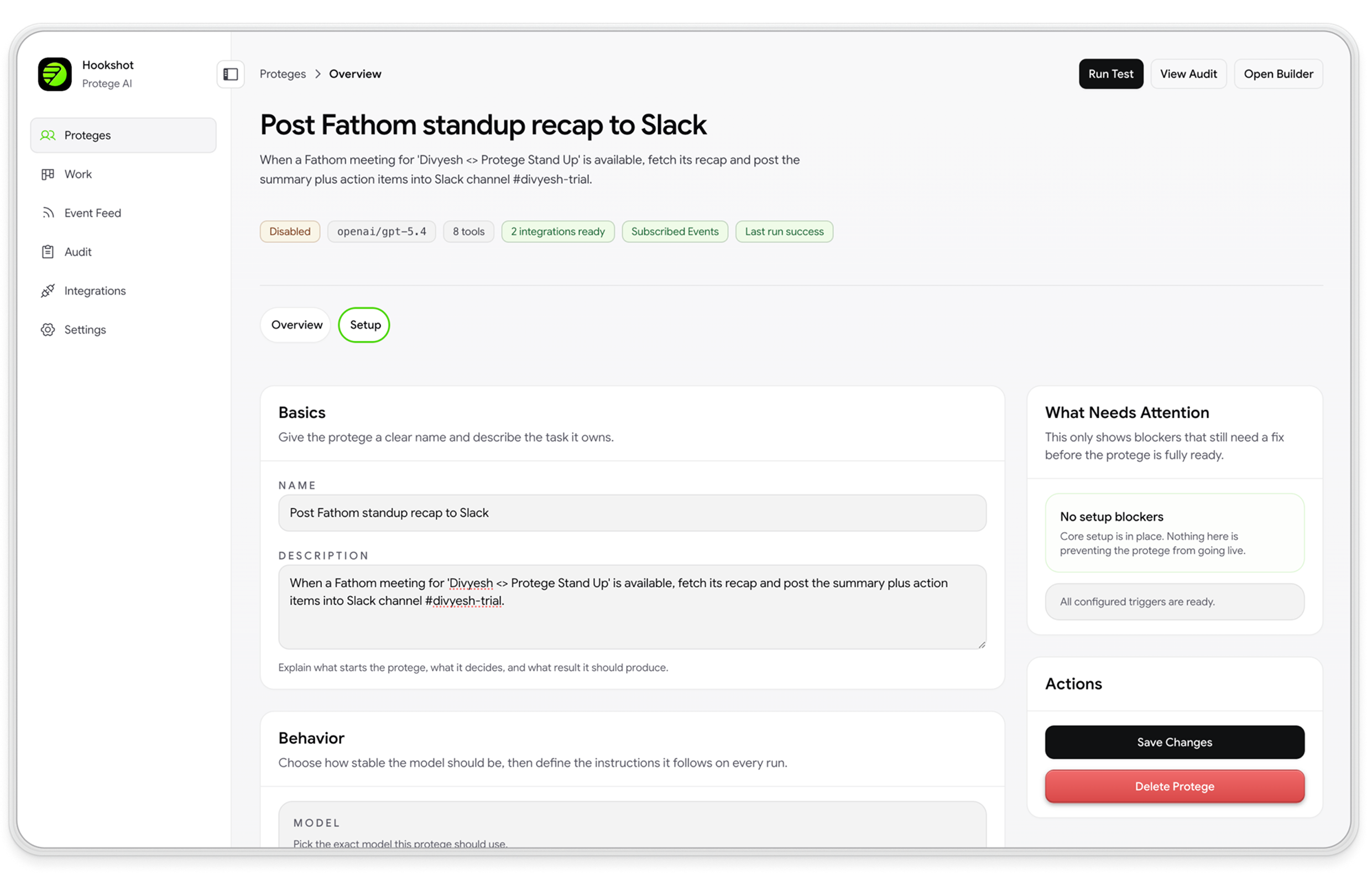
Hookshot™ is built for that second layer. When a real event fires in a connected tool (a Jira ticket created, a ServiceNow case escalated, a Slack message posted), the platform evaluates it, routes specialized agents in parallel, and executes across every system your team already uses.
The lifecycle follows Connect → Preview → Approve:
- Connect: wire Jira, Confluence, ServiceNow, Asana, Slack, and 1,000+ tools via MCP in one pass
- Preview mode: the agent runs alongside live work and shows the action it would take, with zero writes until your team approves
- Per-run audit trail: every agent run produces a step-by-step record of decisions, tool calls, skips, and outcomes across all connected systems
Rovo gives your Atlassian teams AI that respects their permissions. Hookshot™ gives your ops and IT teams a governed path for the work that does not stop at Atlassian’s edge.
The bottom line
Atlassian Rovo is a solid AI layer for teams centered on Jira, Confluence, and Jira Service Management. Search, Chat, Studio, and Agents cover the full arc from finding knowledge to automating work, grounded in 150 billion+ Teamwork Graph connections and bounded by permission and privacy controls you can verify in Admin Hub.
Four things to take away:
- Rovo is included on paid Cloud plans (Standard, Premium, and Enterprise) with credit allowances that scale by tier (25 / 70 / 150 per user per month).
- Governance controls are documented and verifiable: permission inheritance, audit attribution, 30-day retention, and no LLM training on customer data.
- Start with Search, then Chat, then Agents. Credit consumption matters; deploy pre-built agents before building custom ones in Studio.
- Plan for cross-system work separately. When governed orchestration with preview and run-level audit must span multiple systems of record, treat Rovo’s native agents as the in-platform starting point and budget for a separate orchestration layer.
If your team lives in Atlassian and wants AI that respects existing permissions, start with Rovo. If your operations span Jira, ServiceNow, Asana, and Slack and you need preview on live work before any write, book a demo and we will show you how Hookshot™ connects once, watches without touching anything live, and turns on writes when your team is ready.
Frequently asked questions
How do you use Rovo search?
Open Rovo Search from the Atlassian navigation bar or use the keyboard shortcut in Jira, Confluence, or Jira Service Management. Type a natural-language query. Rovo returns results from Atlassian apps and connected third-party tools, ranked by relevance and filtered to what you have permission to view. Click a result to jump to the source page or record.
Is Atlassian Rovo free?
Rovo is included at no additional charge on paid Standard, Premium, and Enterprise Cloud plans for Jira, Confluence, and Jira Service Management. There is no separate Rovo subscription fee on those plans. Usage is governed by a monthly per-user credit allowance (25 on Standard, 70 on Premium, 150 on Enterprise). Atlassian also offers Rovo Standard as a standalone product currently in beta and free of charge; after beta, it will be a paid add-on. There is no unlimited free tier for full Rovo capabilities.
What is Rovo chat in Atlassian?
Rovo Chat is a conversational AI interface inside Atlassian Cloud that answers questions about your organization's work. It draws context from the Teamwork Graph (Jira issues, Confluence pages, connected SaaS data, and more) and responds in natural language. You can ask follow-up questions, request summaries, or trigger agent actions from the chat panel.
What is the first step a user needs to take to use Rovo chat?
Make sure your organization is on a paid Atlassian Cloud plan with Rovo enabled (Standard, Premium, or Enterprise). Then open any Atlassian app where Rovo is available: Jira, Confluence, or Jira Service Management. Click the Rovo icon in the top navigation. The chat panel opens immediately; no separate setup is required for individual users beyond having the appropriate product access.
Can Rovo act on tools outside Atlassian (ServiceNow, Asana, Slack)?
Rovo Search can index and surface data from 75+ connected third-party tools via Atlassian connectors, and the Teamwork Graph MCP server lets external AI agents query Atlassian context. Rovo Agents are primarily designed to act within Atlassian apps (creating issues, updating pages, running playbooks). Governed, multi-system-of-record actions with preview and a single run-level audit timeline across tools like ServiceNow, Asana, or Slack typically require a vendor-neutral orchestration layer on top of Rovo's native capabilities.
Is Rovo actually used by 90% of enterprise customers?
Per Atlassian's Team '26 conference (self-reported), more than 90% of enterprise Cloud customers use Rovo and logged 14 million Rovo-assisted actions in a recent month. Context matters: Atlassian's own admin docs describe Rovo as allowed by default on paid Cloud plans. Org admins can block AI features per app, but the product itself cannot be fully removed. The 90%+ figure tracks default-on provisioning more than active engagement. Atlassian's Q2 FY26 shareholder letter reported Rovo surpassed 5 million monthly active users against 350,000+ total customers. Dividing 14M actions by ~5M MAU is roughly 2.8 actions per active user per month, and many of those actions are free inline features rather than Chat or Agent sessions. For buyer planning, think of the 90% figure as reach across provisioned accounts, with deeper engagement concentrated in Search and inline summaries.